XMEye - Best Cloud-Based CCTV Monitoring App
In the era of smart security, video monitoring systems have become indispensable. Among the many options available, XMEye stands out for its advanced features, user-friendly interface, and seamless integration with cloud technology. Designed for IPCs (Internet Protocol Cameras) and DVRs (Digital Video Recorders), XMEye is a reliable solution that caters to personal and professional surveillance needs.
In this article, we will explore everything about XMEye, including its features, benefits, setup process, and common troubleshooting tips.
What is XMEye?
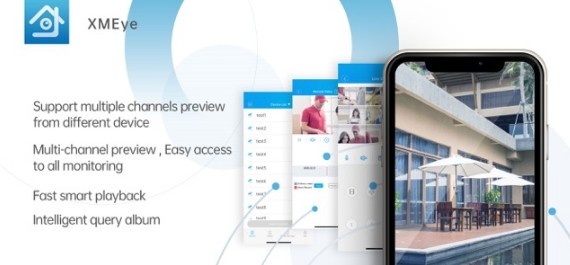
XMEye is a professional video monitoring software developed specifically for IPCs and DVRs. Its cloud-based architecture allows users to remotely access live video feeds, playback recordings, and perform operations directly from their Android devices. With just a serial number, users can securely log in to their devices without complex configuration.
Key Features of XMEye
Cloud Integration
XMEye leverages cloud technology to simplify surveillance. This allows users to access their video feeds from anywhere without configuring static IPs or setting up port forwarding.
User-Friendly Interface
The app's intuitive design ensures easy navigation, even for non-technical users. Key functions like live view, playback, and settings are straightforward to use.
Remote Monitoring
Monitor real-time footage from IPCs and DVRs on your Android device. Whether you're at home, work, or traveling, XMEye ensures you're always connected to your security system.
Playback Functionality
Review past recordings effortlessly. The app allows users to filter and search through videos by time and date.
Two-Way Communication
Some devices supported by XMEye feature two-way audio, enabling users to communicate with individuals at the surveillance site.
Push Notifications and Alerts
Receive instant notifications for motion detection or other triggered events, keeping you informed of any unusual activity.
Cross-Platform Compatibility
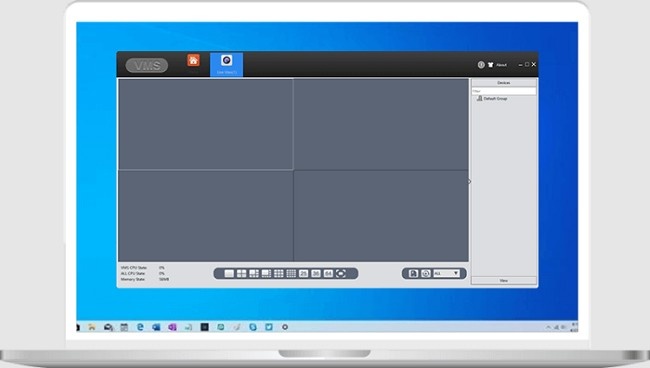
While primarily designed for Android devices, XMEye is also available for iOS and PC, making it versatile and accessible.
Benefits of Using XMEye
Enhanced Security
XMEye ensures constant surveillance, deterring potential threats and providing evidence in case of incidents.
Cost-Effective
The app is free to download, and its cloud integration eliminates the need for expensive networking setups.
Convenience
Remote access through the app eliminates geographical limitations, giving users peace of mind wherever they are.
Scalability
Whether you're managing a single camera or a large-scale security system, XMEye supports multiple devices with ease.
How to Download & Set Up XMEye App?
Setting up XMEye is a straightforward process. Here's a step-by-step guide:
1. Download the App
Visit the Google Play Store or Apple App Store and search for "XMEye."
Download and install the app on your device.
2. Register or Log In
Open the app and register for a new account or log in with your existing credentials.
3. Add Your Device
Click the “+” icon to add a new device.
Enter the device's serial number (usually found on the device label or manual).
Assign a name to the device for easy identification.
4. Start Monitoring
Once the device is added, you can view live feeds, adjust settings, and playback recordings.
Troubleshooting Common Issues in XMEye
Despite its reliability, users might encounter occasional issues. Here’s how to resolve some common problems:
1. Unable to Connect to the Device
Ensure the device is powered on and connected to the internet.
Check that the serial number is entered correctly.
Restart the app or the device.
2. Poor Video Quality
Adjust the resolution settings in the app for better clarity.
Ensure a stable internet connection for smoother streaming.
3. Login Issues
Verify your username and password.
Reset your password if necessary using the "Forgot Password" option.
4. Missing Recordings
Check the storage settings on your DVR or IPC.
Ensure the device has adequate storage space or cloud backup.
Tips for Maximizing XMEye’s Potential
Use High-Speed Internet
A stable and fast internet connection ensures seamless streaming and quicker playback access.
Enable Notifications
Set up motion detection and alerts to stay informed of any unusual activities.
Regular Updates
Keep the app and your devices updated to access the latest features and security patches.
Secure Your Account
Use strong passwords and avoid sharing your login details to prevent unauthorized access.
Integrate Additional Devices
If you’re managing a larger area, consider adding more IPCs or DVRs to your XMEye account.
Alternatives to XMEye
While XMEye is a robust solution, other video monitoring apps might suit specific needs. Some popular alternatives include:
iVMS-4500
Known for its advanced features and broad device compatibility.
Hik-Connect
A great option for Hikvision devices with enhanced analytics.
TinyCam Monitor
Ideal for multi-camera setups, supporting a variety of brands.
Conclusion
XMEye combines the power of cloud technology with a user-centric approach, making it an ideal choice for video monitoring. Whether you’re securing your home or managing a commercial property, its features ensure reliable surveillance and peace of mind. With its easy setup, intuitive interface, and robust capabilities, XMEye proves to be a game-changer in the world of security.
Start your journey with XMEye today and experience seamless video monitoring like never before.